
Step 1: Create your account!

Go to the LetterBucket homepage. You’ll see a button in the top-right corner that says “Join Now”. Click on it to begin the registration process. Letterbucket Signup
Step 2: Fill in your details

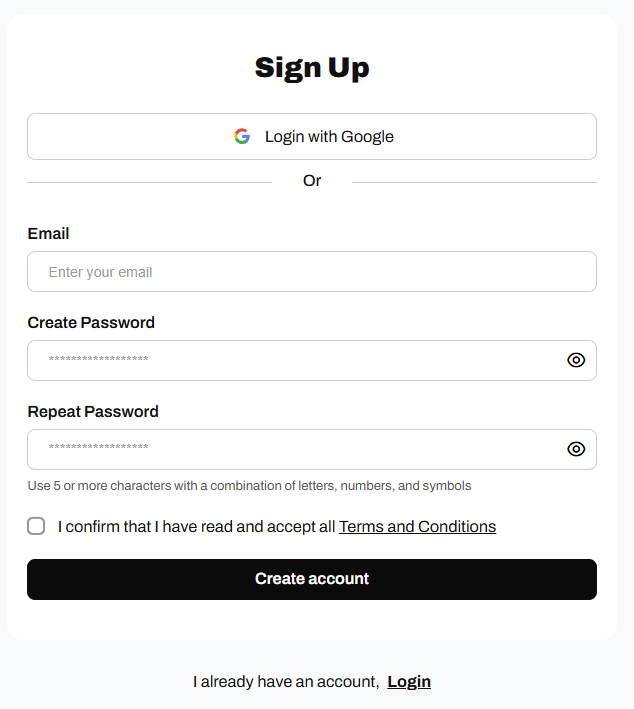
Once you click on “Join Now”, you’ll be redirected to the registration page. Here you can choose how to register:
  • Using Google: If you prefer the quickest method, simply click on the “Login with Google” button. This will allow you to create your account with your Gmail address.
  • With your email: enter your email address and create a password. Make sure the password is at least 5 characters long and combines letters, numbers, and symbols for greater security.
Don’t forget to check the box to confirm that you have read and accepted the Terms and Conditions. When you have completed the fields, click on “Create account”.

Step 3: Verify your email address

After clicking “Create account”, you will receive a confirmation message. You’ll see a screen asking you to verify your email address. Check your inbox. You should find an email from LetterBucket with the subject “Please Confirm Your Email Address”. If you don’t see it, check your spam or junk mail folder. Open the email and click the “Confirm Email” button. This will complete your registration and take you directly to the LetterBucket onboarding process.